Elecrow CrowPi 3 puts sensors at the centre of AI learning
A portable Raspberry Pi learning station combines 41 modules with practical coding lessons, though buyers should distinguish its hardware capabilities from its online AI services.
By Davy Currie · · 5 min read
Key facts
- 01Elecrow CrowPi 3 combines 41 sensors and modules with more than 180 lessons.
- 02CrowPi 3 includes a 4.3-inch touchscreen, 2MP camera, microphone and full-size HDMI output.
- 03Elecrow’s Basic Kit requires a Raspberry Pi 5; the Advanced Kit includes a 16GB Pi 5.
- 04December 2025 Elecrow store prices were $229 for the Basic Kit and $439 for the Advanced Kit.
- 05CrowPi 3 measures 285 × 185 × 38mm and weighs 1,100g.
- 06CrowPi 3 lessons cover OpenCV, speech recognition and connections to ChatGPT, Gemini and DeepSeek.
Elecrow’s CrowPi 3 is a portable Raspberry Pi 5 learning station that combines 41 sensors and modules with more than 180 lessons, spanning basic electronics, computer vision and connections to AI services. December 2025 pricing put its Basic Kit at $229 and its Advanced Kit at $439 on Elecrow’s store; those are historical US-dollar figures, not confirmed current UK prices.
What happened
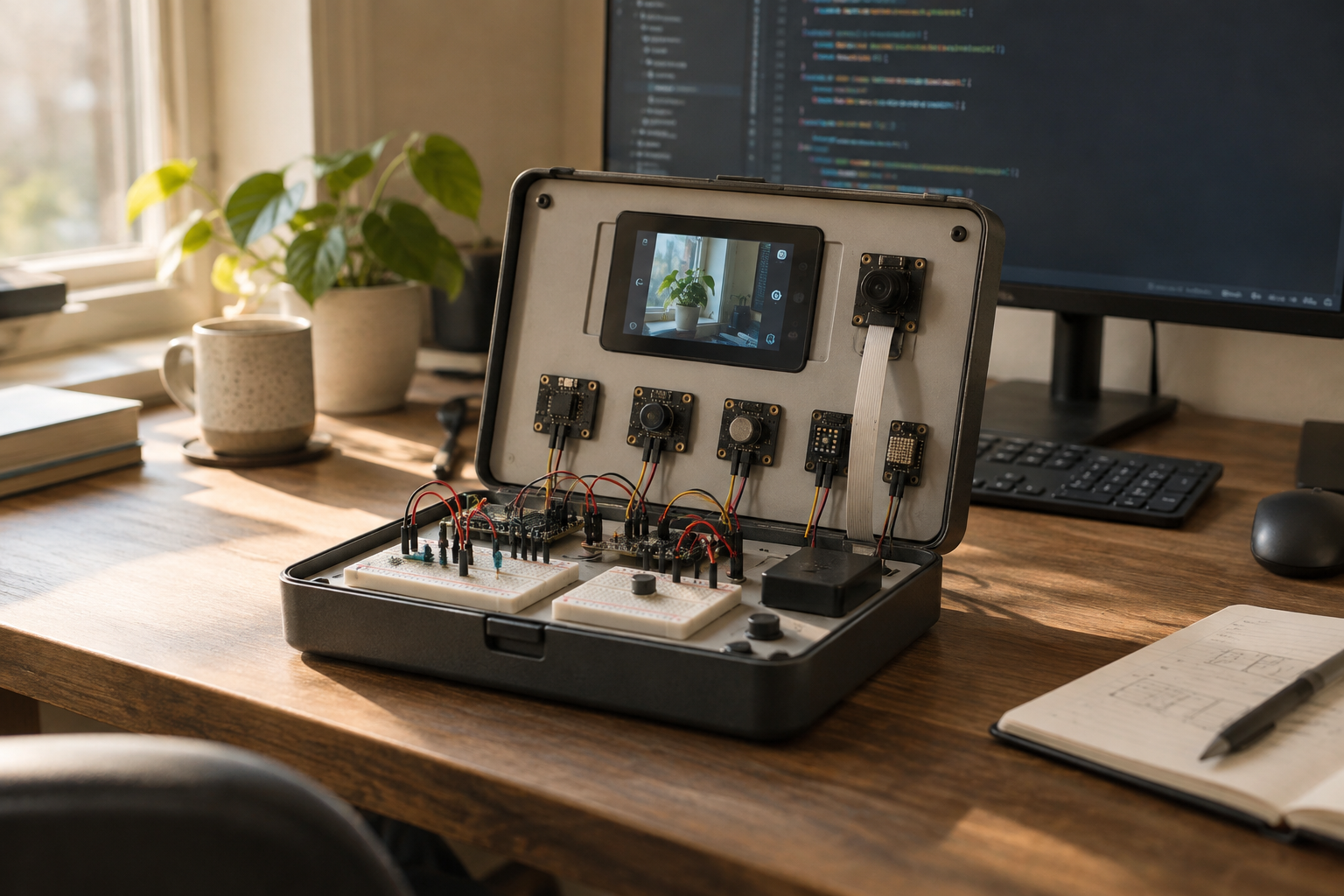
The CrowPi 3 packages electronics teaching equipment into a carry case measuring 285 × 185 × 38mm and weighing 1,100g. Rather than asking a beginner to assemble a computer and wire every peripheral before starting, it provides pre-wired modules, labelled connections and a course structure. For a family study or shared worktable, that reduces the setup between opening the case and running an experiment.
Its exposed components include an ultrasonic sensor, buzzer, tilt switch, RFID reader and flame sensor. Labels and pin numbers are printed on the board, helping learners connect the instructions in their code with a particular physical component. Two breadboards provide space for custom circuits once the built-in exercises become familiar.
A hinged 4.3-inch touchscreen can sit flat or tilt towards the user, with a 2MP camera mounted above it and a microphone available for audio projects. The display has an 800 × 480 resolution and a stated brightness of 300 nits. A full-size HDMI output allows an external monitor to take over when a lesson needs more screen space.
The distinction between the two kits is important: the Basic Kit requires the buyer to supply a Raspberry Pi 5. The Advanced Kit includes a 16GB Pi 5, wireless keyboard and mouse, two 18650 batteries and two game controllers. Comparing prices without accounting for the computer and peripherals would therefore give a misleading picture of the cost to begin.
The background
Elecrow’s first CrowPi appeared on Kickstarter in 2018, pairing a Raspberry Pi 3B+ with a carrying case. CrowPi 2 subsequently incorporated more than 22 sensors and modules. This third version expands the component count and adds AI courses, alongside support for Pico and micro:bit hardware that the earlier kits lacked.
The new board can also accommodate an Arduino Nano. That makes the case more than a single-computer accessory: learners can encounter different development platforms without abandoning the same physical workspace. Elecrow describes the design as open source and provides resources on GitHub, potentially giving more experienced users a route beyond the supplied curriculum.
Its principal educational advantage is the visibility of inputs and outputs. An ultrasonic sensor produces a reading; a program interprets it; a buzzer or light responds. That sequence is easier to examine than the behaviour of a finished smart speaker, where microphones, software and service connections are largely concealed from the user.
This is also a useful distinction within artificial intelligence and smart-home technology. A sensor-driven lighting exercise does not need a conversational model simply because both appear in the same course. Learning where a straightforward rule is sufficient, and where image or speech processing adds something useful, is a practical foundation for understanding connected homes.
The curriculum includes OpenCV image processing, object tracking, face recognition, QR codes, pedestrian and vehicle detection, and speech recognition. These are separate technical tasks rather than one general-purpose intelligence. A successful object-tracking exercise should not be mistaken for a finished security system, just as detecting a flame on a teaching board does not establish its suitability as a household alarm.
What people are saying
Elecrow positions the kit around more than 180 lessons and projects with visible, modest outcomes. Its examples include a voice-activated night light and a coin-recognising piggy bank that plays a sound when money is deposited. These projects give beginners a bounded task, rather than asking them to build an open-ended assistant before understanding the underlying hardware.
The company also includes a Minecraft course in which presenting an NFC card triggers TNT in the game. The educational purpose is the connection between a physical input and a software event. For parents assessing the kit, that offers a more concrete indication of the teaching approach than the broad promise of learning AI.
For an owner familiar with professionally integrated technology, the likely appeal is explanatory rather than operational. A child can explore why a sensor needs a threshold or why a voice instruction needs interpretation without being given access to the household’s installed control system. Keeping those experiments separate from lighting, access control and other live services would be a sensible boundary.
The touchscreen specification deserves similar perspective. At 800 × 480 pixels, it offers limited space for code, instructions and debugging information together. Buyers planning longer sessions should allow for a monitor and a comfortable keyboard position, rather than assume the briefcase format replaces a properly arranged desk.
What happens next
The first purchasing question is which hardware a household already owns. A spare Pi 5 may make the Basic Kit appropriate; a new learner starting without a computer or input devices has a different requirement. Current availability, UK pricing, delivery charges and the precise contents of the chosen listing should be checked before ordering.
The next question concerns the AI lessons. Connections to ChatGPT, Gemini and DeepSeek rely on external services for models of that scale, rather than turning the Pi 5 into a self-contained equivalent. A family should establish which accounts, network access and service arrangements each exercise requires before treating the kit as ready for independent use.
Camera and microphone projects warrant a deliberate setup too. Buyers should check whether a particular lesson processes material locally or sends it to a service, and avoid using private household recordings until that is clear. The distinction between a learning interface and an authorised connection also underpins wider questions about permissions in AI-linked home technology.
The supplied information does not establish a current UK retail price, a schedule for future lessons or how long the learning software will be maintained. Those are useful questions for Elecrow because a teaching kit’s long-term value depends on usable instructions and compatible software, not simply on how many components remain inside the case.
Why this matters
The CrowPi 3 offers a tangible way for families to examine technologies that otherwise arrive as sealed products or subscription services. Its strongest proposition is not that children can connect to a chatbot, but that they can see how sensing, code and physical responses fit together. For a technology-rich home, that makes it an educational companion to installed systems—not a substitute for them—and a purchase best judged on the quality of its lessons, workspace requirements and service dependencies.
Questions answered
+What is the Elecrow CrowPi 3?
The CrowPi 3 is a portable Raspberry Pi 5 learning station with 41 sensors and modules. Elecrow provides more than 180 lessons covering electronics, coding, computer vision, speech recognition and connections to AI services.
+How much does the CrowPi 3 cost?
December 2025 prices on Elecrow’s store were $229 for the Basic Kit and $439 for the Advanced Kit. These are historical US-dollar prices; current UK pricing and delivery charges need checking.
+Does the CrowPi 3 include a Raspberry Pi?
The Basic Kit requires a separately supplied Raspberry Pi 5. The Advanced Kit includes a 16GB Pi 5, wireless keyboard and mouse, two 18650 batteries and two game controllers.
+Can the CrowPi 3 run ChatGPT offline?
Its ChatGPT, Gemini and DeepSeek lessons connect to external services for models of that scale. The Pi 5 is not a self-contained offline equivalent of those services.
+Does the CrowPi 3 need an external monitor?
It has a built-in 4.3-inch, 800 × 480 touchscreen. An external monitor can connect through full-size HDMI and offers more space for code, instructions and debugging during longer sessions.
+What can children build with the CrowPi 3?
Elecrow’s examples include a voice-activated night light, a coin-recognising piggy bank that plays sounds and a Minecraft exercise where an NFC card triggers an in-game event.
+Does CrowPi 3 support Arduino and micro:bit?
The board can accommodate a Pico, Arduino Nano or micro:bit alongside the Raspberry Pi 5. Two breadboards also provide space for custom circuits.
More in Cool Stuff
 Latest Tech
ChatGPT Deep Research puts home specifications under scrutiny
OpenAI’s report-writing tool offers a useful starting point for complex home technology projects, but research and installation-ready specifications remain different things.
10 October 2026 · 5 min
 Latest Tech
Google AI Overviews change smart-home technology research
Google’s AI-generated search answers put greater emphasis on checking evidence before choosing technology for a luxury home.
10 October 2026 · 5 min
 Latest Tech
ChatGPT Search changes how owners research home technology
OpenAI’s web-connected assistant can help navigate home-technology research, but current information, compatible equipment and a dependable specification remain three different things.
10 October 2026 · 5 min